Exercise 1: The Arrival
Time: 30 min
Next: Exercise 2: The Subterranean Divide

Vertex Trust Bank is drowning in legacy hypervisor costs. Sarah, the CTO, hands you a fresh SUSE Virtualization (Harvester) cluster and a Rancher Prime instance that do not know about each other yet. Your first job: connect them, tour the UIs, and confirm you can drive the platform from a terminal.
After rodeo up, Harvester and Rancher are up; import is intentionally left for you. If your instructor gave you a lab through the claim portal, your lab page has the URLs, the passwords and the SSH command for your lab host. If you deployed the lab yourself, the passwords are in ~/.rodeo/secrets.yaml on the KVM host (harvester_admin_password, rancher_admin_password).
| Field | Value |
|---|---|
| Username | admin |
| Harvester UI | https://<host-ip>:8443 |
| Rancher UI | https://<host-ip>:30002 |
| Passwords | your lab page, or ~/.rodeo/secrets.yaml |
Note: Both UIs use self-signed certificates. Accept the browser security warning when it appears.
1.1 Verify both backends
From a shell on the KVM host (on a claim-portal lab, that's your ssh -p 2222 student@... session):
curl -sk https://192.168.122.10/v1 | jq -r '.id'

# Rancher's /v3 requires a bearer token even for the root document; an
# anonymous GET (or HTTP Basic Auth) returns 401. Paste the Rancher password
# from your lab page when asked (it isn't echoed).
read -rsp 'Rancher password: ' RANCHER_PW; echo
RANCHER_TOKEN=$(curl -sk -X POST "https://192.168.122.9:30002/v3-public/localProviders/local?action=login" \
  -H 'Content-Type: application/json' \
  -d "{\"username\":\"admin\",\"password\":\"$RANCHER_PW\"}" | jq -r '.token')
curl -sk -H "Authorization: Bearer $RANCHER_TOKEN" https://192.168.122.9:30002/v3 | jq -r '.type'
Expect v1 from Harvester and apiRoot from the authenticated Rancher call (that's the discovery root's own type; a specific listing like /v3/clusters would say collection).
Deployed the lab yourself? Take the password from
grep '^rancher_admin_password:' ~/.rodeo/secrets.yamlinstead (anchor the grep: the file's comment header repeats each key name).rodeo statusthen shows the three Harvester nodes and the rancher VM; it needs libvirt access, so it doesn't work from a claim-portal student account.
1.2 Import Harvester into Rancher
- Open Rancher at
https://<host-ip>:30002and log in asadmin. - Left sidebar → Virtualization Management → Import Existing.
- Set Cluster Name to
harvester(exact name, later exercises assume it). - Click Create, then copy the registration URL shown (
https://rancher.192-168-122-9.sslip.io:30002/v3/import/...yamlor similar, ending in.yaml).
In the Harvester UI (https://<host-ip>:8443):
- Left sidebar → Settings (gear).
- Find cluster-registration-url → edit → paste the URL → check Insecure Skip TLS Verify (Rancher's cert is self-signed) → Save.
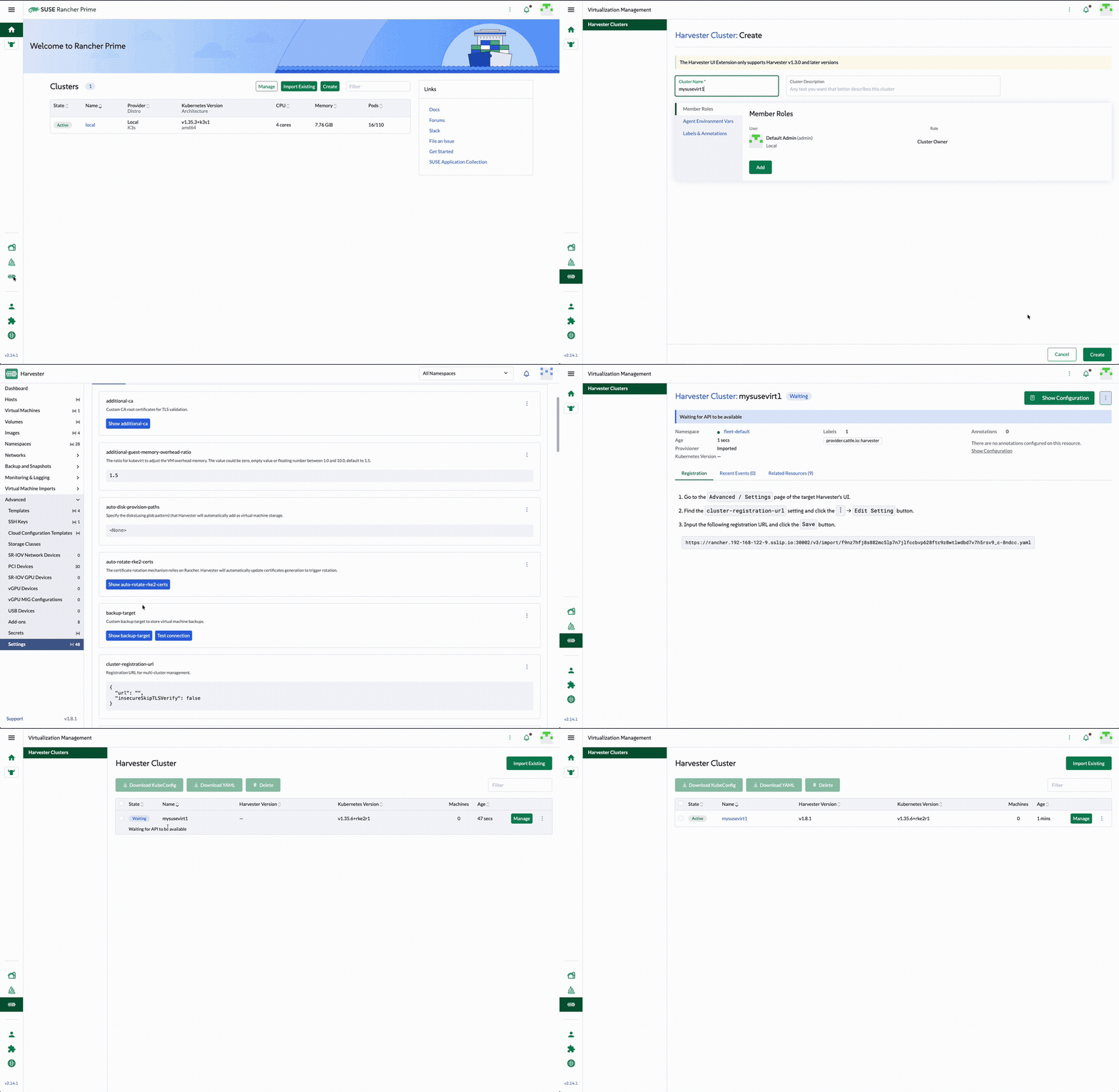
Wait 1-3 minutes. In Rancher → Virtualization Management the cluster moves Pending → Waiting → Active.
Important: the cluster name must be exactly
harvester. Later exercises assume it.
1.3 Tour the SUSE Virtualization dashboard
Open the Harvester UI (directly or via Rancher → Virtualization Management → harvester).
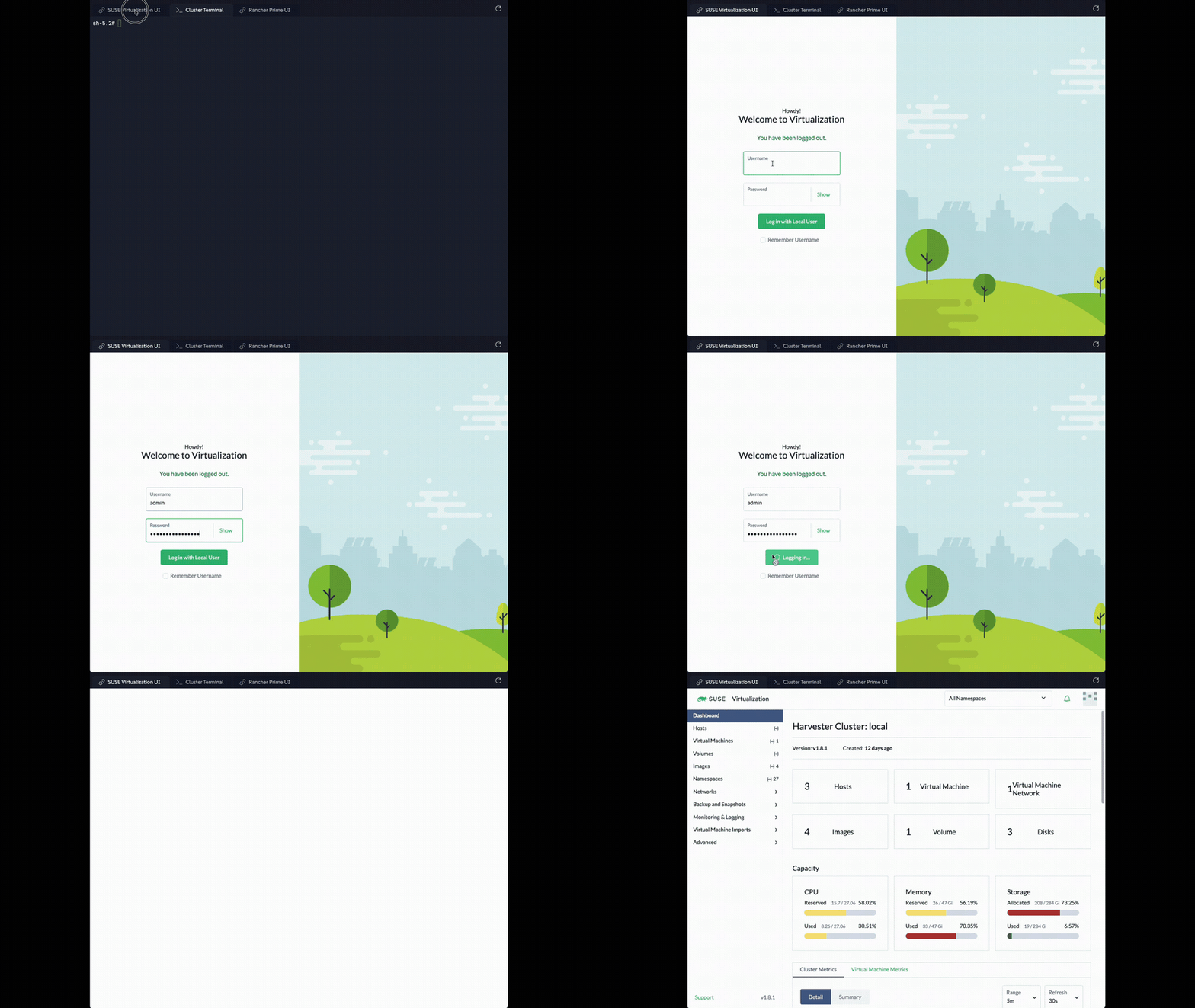
On the Dashboard, confirm:
- Hosts - three nodes
- Virtual Machines -
webserver-prodanddaily-batch-processoralready running. Deploy automation pre-creates them as its last step; you'll use both in Exercise 4 - Images, Volumes, capacity and metrics panels
- Bottom-left Support → Download KubeConfig (save it, you need it in 1.5)
- Generate Support Bundle - know where it is for real incidents
Do not change anything yet. This exercise is orientation plus the import.
1.4 Meet Rancher Prime
Back in Rancher:
- Cluster Management still lists
local(Rancher's own K3s). - Virtualization Management now lists
harvesteras Active.
Rancher is the fleet commander: identity, multi-cluster, and later the place you provision guest Kubernetes. Harvester remains the place you run VMs.
1.5 Terminal access
Put the kubeconfig you downloaded in 1.3 on the KVM host as ~/.kube/config, kubectl's default location. The simplest way: open the downloaded file in a text editor, copy all of it, then on the KVM host run:
(Or copy the file from your laptop. On a claim-portal lab: ssh -p 2222 -i student-01.key student@<host-ip> mkdir -p .kube, then scp -P 2222 -i student-01.key local.yaml student@<host-ip>:.kube/config.)
The downloaded file points at the address you opened the UI with, for example https://<host-ip>:8443. From the KVM host, kubectl has to talk to the cluster VIP instead, because the Harvester certificate only covers that address. Rewrite the server line:
Then drive the cluster from the terminal:

All three nodes should be Ready. Core Harvester pods should be running. Every later terminal step in this workshop uses this kubeconfig.
Deployed the lab yourself? You can also open a shell on a Harvester node:
sudo rodeo ssh harvester1, thensudo -E /var/lib/rancher/rke2/bin/kubectl --kubeconfig /etc/rancher/rke2/rke2.yaml get nodes. That needs sudo on the KVM host, so it doesn't work from a claim-portal student account.
Check your work: /opt/suse-virt-workshop/checks/check-exercise-1.sh.